Alerts & Notifications
Push billing, subscription, usage, and operational events to your own systems via signed webhooks. Define custom events with declarative trigger rules.
Overview#
Aforo's notification subsystem pushes events to your systems the moment something material happens — an invoice is finalized, a wallet crosses a low-balance threshold, a customer's usage trips a quota. Every event ships as a signed JSON POST to a webhook endpoint you register. You verify the HMAC signature, parse the payload, react.
There are two kinds of events. SYSTEM events are the 14 built-in ones Aforo publishes from its own services (billing-service, pricing-service, usage-ingestor, analytics-service, organization-service). CUSTOM events are ones you define in the operator UI with a name, severity, default delivery channels, and optionally a JSON trigger rule that fires the event automatically when a matching SYSTEM event lands.
storefront-service (port 8089 on local dev, https://storefront.aforo.ai in production). All endpoints below assume this base URL.How firing works#
From the moment a business action happens to the moment your webhook receives a signed POST, the path is the same for every event type:
Business action                           Aforo internal                                Your system
──────────────────                          ──────────────────                              ──────────────
Invoice finalized                ─▶ billing-service publishes Kafka event
                                       │
                                       ▼
                                 CatalogEventBridgeConsumer
                                 maps Kafka topic ─▶ SYSTEM event type
                                       │
                                       ▼
                                 CustomerNotificationService.dispatch
                                       │
                                       ├─▶ load customer's preferences
                                       │    (preferred channels, cooldown)
                                       │
                                       ├─▶ load customer's webhook endpoints
                                       │    that subscribed to this event
                                       │
                                       ├─▶ V140 TriggerEngine
                                       │    (fan-out to CUSTOM events
                                       │     whose trigger rule matches)
                                       │
                                       ▼
                                 WebhookChannel.dispatch
                                       │
                                       ├─▶ compute HmacSHA256(t + "." + body, secret)
                                       │
                                       ▼                                            HTTPS POST + signature
                                                                       ─────────────▶ your /webhooks/aforo
                                                                                              │
                                                                                              ▼
                                                                                       verify signature
                                                                                       parse payload
                                                                                       react
Three things to pin down before reading further:
- Webhook endpoints are scoped to a customer — not a workspace. Each row in
customer_webhook_endpointsis keyed by(tenant_id, end_customer_id). An event for Acme reaches only Acme's endpoints — not ZingPing's, even in the same workspace. - Events are filtered by subscription. An endpoint registered with
events: ["INVOICE_GENERATED"]will NOT receiveSUBSCRIPTION_CANCELLED. The one exception is the reservedwebhook.testprobe, which bypasses the filter for wiring smoke tests. - Every delivery is signed with HMAC-SHA256 using the secret you supplied at registration. The signature lives in the
X-Aforo-Signatureheader in Stripe-stylet=<unix>,v1=<hex>format. You verify it before trusting the body.
The 14 SYSTEM events#
These are emitted by Aforo's own services when their owning business action happens. You don't fire them — you subscribe to them.
| Event | Category | Severity | Fires when |
|---|---|---|---|
INVOICE_GENERATED | Billing | INFO | A new invoice is finalized (real action, not draft). |
PAYMENT_OVERDUE | Billing | CRITICAL | Dunning escalation past the retry budget. |
WALLET_LOW_BALANCE | Billing | WARNING | Prepaid wallet crosses the configured low-balance threshold. |
SUBSCRIPTION_ACTIVATED | Subscription | INFO | A draft subscription is activated, or a trial converts. |
SUBSCRIPTION_CANCELLED | Subscription | WARNING | A subscription is cancelled (immediate or end-of-period). |
TRIAL_EXPIRED | Subscription | CRITICAL | A free-trial subscription crosses its end date without conversion. |
TRIAL_EXPIRING_SOON | Subscription | WARNING | A trial is N days from expiry (configurable per workspace). |
USAGE_LIMIT_EXCEEDED | Usage | CRITICAL | Usage crosses 100% of the configured quota. |
USAGE_THRESHOLD_REACHED | Usage | WARNING | Usage crosses the 80% or 90% warning threshold. |
PACING_ALERT_PROJECTED | Usage | WARNING | Daily usage trend projects month-end quota exhaustion. |
WEEKLY_DROP_DETECTED | Usage | WARNING | A customer's week-over-week usage drops by > 50% (churn signal). |
CREDENTIAL_DRIFT_DETECTED | Service | WARNING | A gateway credential mismatches Aforo's recorded state. |
PROVISIONING_EXHAUSTED | Service | CRITICAL | The provisioning queue saturates beyond the per-workspace cap. |
SERVICE_DEGRADATION | Service | CRITICAL | Uptime monitor trips the degradation threshold (latency, error rate). |
Example payload#
Every event arrives as JSON with the same envelope shape. The payload object varies by event type; the outer fields are constant.
payload.subscriptionId, payload.invoiceId, and payload.productId let you cross-reference back to the right entity in your own system without a second API call. The bridge consumer forwards the producer's payload verbatim — no field is dropped or normalized away.Custom events (V140)#
Custom events are how you push your own business-meaningful events through the same dispatch + signing + retry pipeline as the 14 built-ins. Two ways they fire:
Manual emit — your backend calls /emit#
Best when your backend already knows when the event should fire and you just need Aforo to handle the fan-out + signing + retry. The endpoint accepts any JSON payload and forwards it verbatim:
The endpoint returns 202 Accepted on success with no body. The event is queued for dispatch and sent on the same path as SYSTEM events.
Auto-trigger — declarative rule on SYSTEM events#
Best when you want a SYSTEM event to also fan out to a CUSTOM event for downstream routing — for example, an INVOICE_GENERATED over $10,000 should also fire a WHALE_CUSTOMER alert to a dedicated Slack channel.
Trigger rules are JSON predicates with three building blocks: sourceEvents (which SYSTEM events arm this trigger), match (the predicate to evaluate against the event payload), and the leaf operators (eq, gte, in, regex, etc).
Supported operators: eq, ne, gt, gte, lt, lte, in, not_in, contains, starts_with, ends_with, regex, and exists. Composites are all (AND), any (OR), and not.
CustomerNotificationServiceImpl.dispatch — the engine checks whether the dispatched event is a workspace-defined CUSTOM row before walking the rules.You define a custom event in the operator UI under Alerts & Notifications → + Add Event Type. Pick name + category + severity, choose the default delivery channels, optionally paste the trigger rule JSON, save. The next matching SYSTEM event auto-fires it.
Register a webhook endpoint#
A webhook endpoint is a row scoped to a specific (tenant, customer) pair. It records the URL Aforo POSTs to, the subscribed event types, and the signing secret. Register one per customer per receiver URL:
Subscribing to all events#
Pass events: ["*"] to subscribe to every event the customer's preferences allow. Use this for operational receivers (a single Datadog drain, an audit log) where you want a complete record without listing every event type by hand.
Verify the HMAC signature#
Every delivery carries an X-Aforo-Signature header. You MUST verify it before trusting the payload. The format is Stripe-style:
To verify: parse t and v1, recompute HmacSHA256(t + "." + rawBody, secret) with the secret you registered, constant-time compare. Same recipe as Stripe's webhook verifier — the bytes signed are exactly t, a period, and the raw HTTP body.
express.json(), FastAPI auto-decode, Spring @RequestBody) reorders keys and strips whitespace. The HMAC was computed over the exact bytes Aforo sent. Capture them before parsing.Delivery semantics#
Retries and backoff#
Aforo retries on any non-2xx response, connection error, or timeout. Exponential backoff is configured per endpoint at register time:
maxRetryAttempts(default 3) — total attempts including the initial delivery.initialBackoffSeconds(default 2) — wait before the 2nd attempt.backoffMultiplier(default 2.0) — each attempt waits N× the previous.
With defaults: t+0, t+2s, t+4s. After the final attempt fails, the delivery row is marked FAILED with the last error message and is not retried again. The next event for the same endpoint dispatches independently.
Idempotency#
Every delivery carries a stable eventId in the JSON body. Use it to deduplicate. Retries reuse the same eventId so your handler can safely treat any second arrival as a duplicate. For CUSTOM events fired by the trigger engine in response to a SYSTEM event, the eventId is derived as <originalEventId>:<customEventType> so even Kafka re-delivery of the source SYSTEM event produces a stable derivative ID.
Ordering#
Events are dispatched in the order their producing services publish them, but retries can re-order arrivals at your endpoint. If you care about strict ordering (e.g.SUBSCRIPTION_ACTIVATED before INVOICE_GENERATED for the first invoice), use the occurredAt field on each event, not arrival order.
Test your integration locally#
Aforo ships a standalone test harness that exercises the full pipeline — webhook registration, signing, signature verification, custom-event emit, delivery logs — without you having to write anything beyond your own receiver. It runs as a small Express app on port 3001 and includes a dashboard for inspecting every delivery in real time.
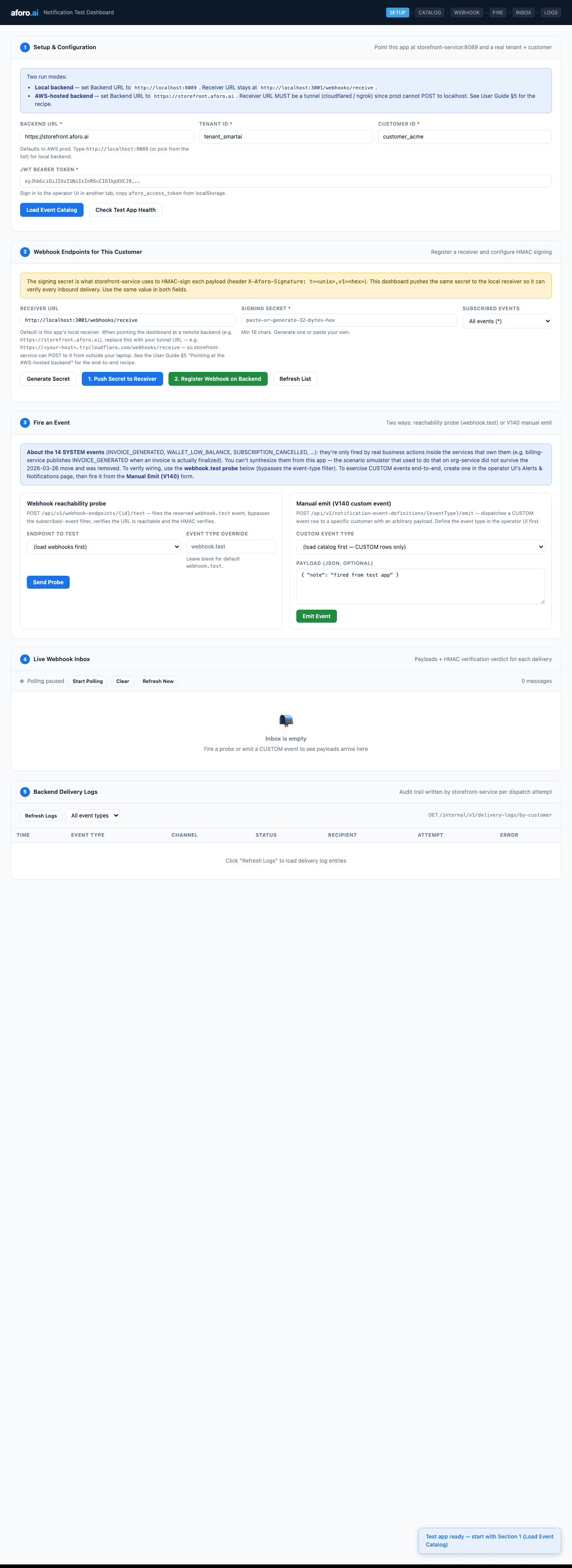
The flow is the same whether you point it at a local backend or AWS prod via a Cloudflare quick tunnel:
- Section 1 — paste your JWT, load the event catalog.
- Section 2 — generate a signing secret, push it to the receiver, register the webhook.
- Section 3 — fire the reachability probe or emit a custom event.
- Section 4 — watch the live inbox light up with verified ✅ badges.
- Section 5 — cross-check the backend's own delivery audit.
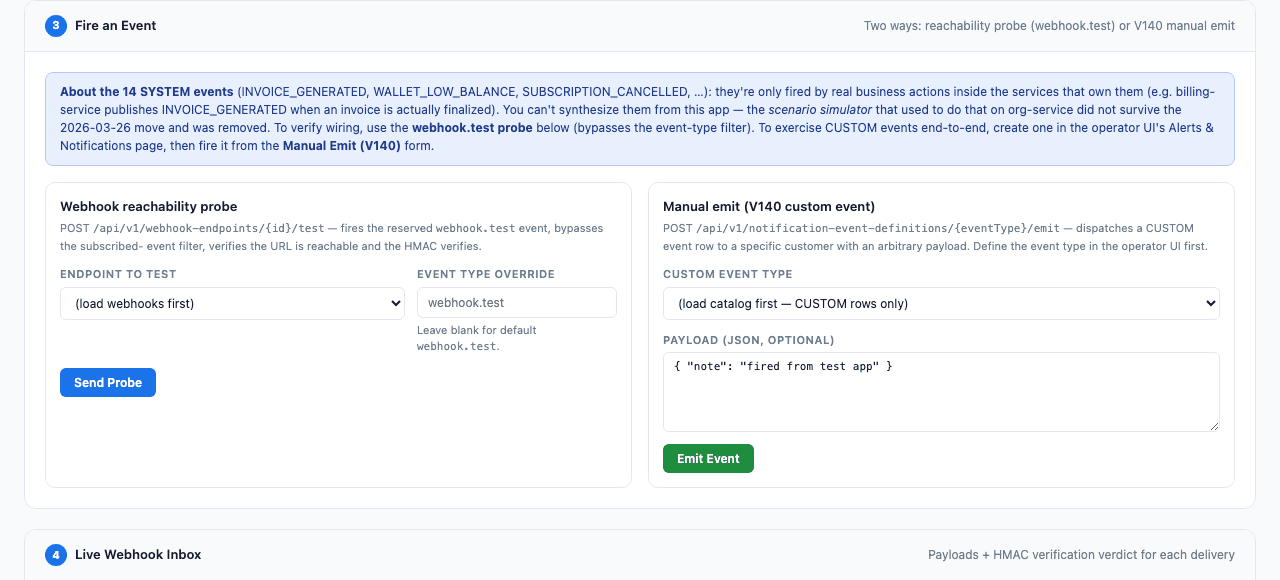
notification-test-app/docs/Aforo-Notification-Test-App-User-Guide.pdf in the org-service repo. It walks the end-to-end flow against AWS prod with a Cloudflare tunnel — including how to grab the AWS Keycloak JWT — and is the right place to send a new integrator who wants to verify their HMAC handler against a real signed delivery.Customer notification preferences#
Your end customers can manage their own notification subscriptions from their portal. Each row in notification_preferences is keyed by (tenant_id, end_customer_id, event_type) and records:
- Whether this event is enabled for this customer at all.
- Which channels (EMAIL / WEBHOOK / IN_PORTAL / SMS / PAGERDUTY) the customer wants to receive it on.
- Optional threshold + cooldown for events that fire on continuous data (e.g. only fire
USAGE_THRESHOLD_REACHEDonce every 60 minutes).
Preferences are applied at dispatch time. If your customer disables an event in their portal, your webhook will stop receiving it for that customer even if your endpoint subscribed to it. The dispatch is logged as SKIPPED in the backend delivery log so you can audit drop-offs.
Two active SYSTEM events are mandatory — they fire regardless of customer preference, because they protect the customer from financial or service-disruption risk:
PAYMENT_OVERDUE— escalation neededSERVICE_DEGRADATION— uptime alert
A third mandatory event, WALLET_BALANCE_DEPLETED, is defined but currently deactivated — no producer emits it yet, so it never fires.
API reference#
| Method | Path | What it does |
|---|---|---|
| GET | /api/v1/admin/event-definitions | List the full event catalog for the current workspace (SYSTEM + CUSTOM rows). |
| POST | /api/v1/admin/event-definitions | Define a CUSTOM event. Body: { eventType, displayName, category, severity, defaultChannels, triggerRule? }. |
| POST | /api/v1/notification-event-definitions/{eventType}/emit | V140 manual emit. Body: { customerId, payload }. Returns 202. |
| POST | /api/v1/webhook-endpoints | Register a webhook endpoint for a customer. |
| GET | /api/v1/webhook-endpoints?endCustomerId={id} | List all webhook endpoints for one customer. |
| PATCH | /api/v1/webhook-endpoints/{id} | Update endpoint (active flag, events list, retry config). Secret is rotation-only. |
| DELETE | /api/v1/webhook-endpoints/{id} | Permanently remove a webhook endpoint. |
| POST | /api/v1/webhook-endpoints/{id}/test | Fire the reserved webhook.test event for wiring smoke tests. |
| GET | /api/v1/notification-preferences | Customer-facing — read current notification subscriptions. |
| PUT | /api/v1/notification-preferences | Customer-facing — update subscriptions for one event type. |
| GET | /internal/v1/delivery-logs/by-customer?endCustomerId={id} | Read the per-customer dispatch audit trail. |
All endpoints expect X-Tenant-Id and Authorization: Bearer <jwt> headers. The JWT must carry OWNER, ADMIN, or BILLING_ADMIN role for admin endpoints; CUSTOMER for portal endpoints. Cross-workspace requests return 404 (existence-leak prevention), not 403.
Troubleshooting#
| Symptom | Most likely cause | Fix |
|---|---|---|
| Backend returns 401 from /admin/event-definitions | JWT expired or signed by the wrong Keycloak realm (e.g. local-dev key against AWS prod). | Refresh the token from the live operator UI. Local-dev JWTs cannot authenticate against storefront.aforo.ai. |
| POST /webhook-endpoints returns 409 | A webhook with the same URL is already registered for this customer. | GET the list, PATCH the existing row, or DELETE it first if you intend to replace. |
| My endpoint never receives a custom event I emitted | Either the customer's preferences disabled it, or the webhook's events filter excludes it. | Pull /internal/v1/delivery-logs/by-customer — SKIPPED rows tell you which gate dropped the dispatch. |
| HMAC verification fails on every delivery | Your handler is hashing the parsed-and-re-stringified body. JSON middleware reorders keys. | Capture the raw request body BEFORE parsing. See the verification samples above for the express.json verify-hook pattern. |
| Verification works locally but fails in production | Two common causes: a CDN/proxy re-encoded the body, or the secret on the receiver doesn't match the one Aforo signed with. | Disable any body-rewriting middleware in front of your handler. Re-PATCH the webhook with a fresh secret if there's any doubt about the active value. |
| Delivery log shows FAILED with "Read timed out" | Your handler is taking > 5 seconds to respond. | Return 2xx immediately, then process asynchronously. Aforo's dispatcher does not wait for your processing — only for the HTTP ack. |
GET /internal/v1/delivery-logs/by-customer?endCustomerId=<id> — you'll see one row per (event, channel, endpoint, attempt) with status DELIVERED / FAILED / PENDING / RETRYING / SKIPPED and the verbatim error for failures.